CSS - Cascading Style Sheets
Colors - Hexadecimal, RGBA and HSLA
In CSS, colors are values used to define the chromatic appearance of an element
(text, background, border, shadow...)
Several methods can be used to represent a color, but they all give access to the
same range of colors.
1. Hexadecimal Colors
The first method is using the hexadecimal color system : a color representation based on
the hecadecimal number system (base 16), mainly used in HTML and CSS.
An hexadecimal color is written with a # followed by 6 decimal and hexa characters (0, 1, 2,
3, 4, 5, 6, 7, 8, 9, A, B, C, D, E, F). E.g., #07E54A
The hexadecimal color is using the RGB system, meaning it has 3 channel : Red, Green, and Blue.
Each channel own 2 hexadecimal character : #000000
Hexadecimals can be simplified if the two characters of each channel are similar :
#000000 = #000
#22FFCC = #2FC
#4444AA = #44A
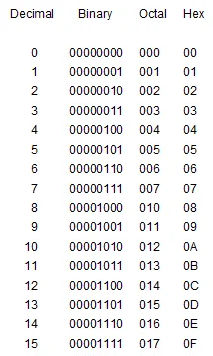
Decimal -> Binary -> Hexadecimal Conversion :
2. RGBA Colors
The second method is the RGBA, a color model based on the additive synthesis of light, so by combining light sources.
It uses four channels (4 bytes) written using the value "rgba(Red, Green, Blue, Alpha)"
Each channel ranges from 0 to 255, however in CSS, the alpha channel is ranged between 0 (fully transparent) and 1 (fully opaque).
Here are few examples of color written using the RGBA system :
White = rgba(255, 255, 255, 1)
Black = rgba(0, 0, 0, 1)
Red = rgba(0, 0, 0, 1)
Green = rgba(0, 255, 0, 1)
Blue = rgba(255, 0, 255, 1)
If the Aplha Channel is equal to 1, the rgba() form can be shortened in rgb(red, green, blue) : without the alpha channel, as 1 is the default Aplha value
3. HSLA Colors
The third method is the HSLA, a color model based on human perception, so by interpreting colors as angles.
It uses four channel (4 bytes) written using the value "hsla(hue, saturation, lightness, Alpha)"
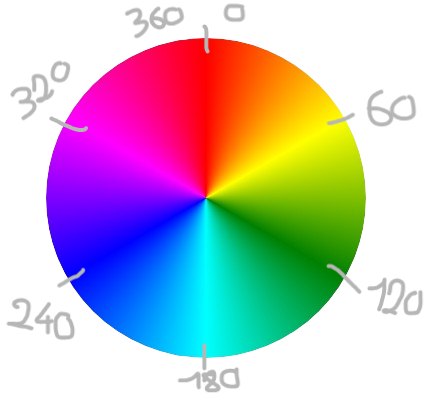
hue → express colors as angles from 0° to 360°
saturation → express color intensity as percentage (0% → 100%)
0% = Grayscale
lightness → express brightness as percentage (0% → 100%)
0% = Black
50% = Normal Color
100% = White
alpha → express transparancy as a range betzeen 0 (fully transparant) to 1 (fully opaque)
4. Named Colors
The last method consist in using predefined CSS colors as value. Indeed, CSS has predefined color keywords
but the existing colors in this method are only the most popular and basics one as :
"black - white - red - orange - green - cyan - turquoise - blue - yellow - pink - etc..."